Health Vision

Led product design for an AI-powered clinical intelligence platform through $47M in Series B and C, turning 350B+ records into a prioritized view of patient risk.

Role
Lead Product Designer
Timeline
2023 – 2026
Shipped
Scope
Information architecture
UX/UI

Design system
Worked with
CTO
Product

Engineering

Clinical stakeholders
Industry
Healthcare technology
Predictive analytics
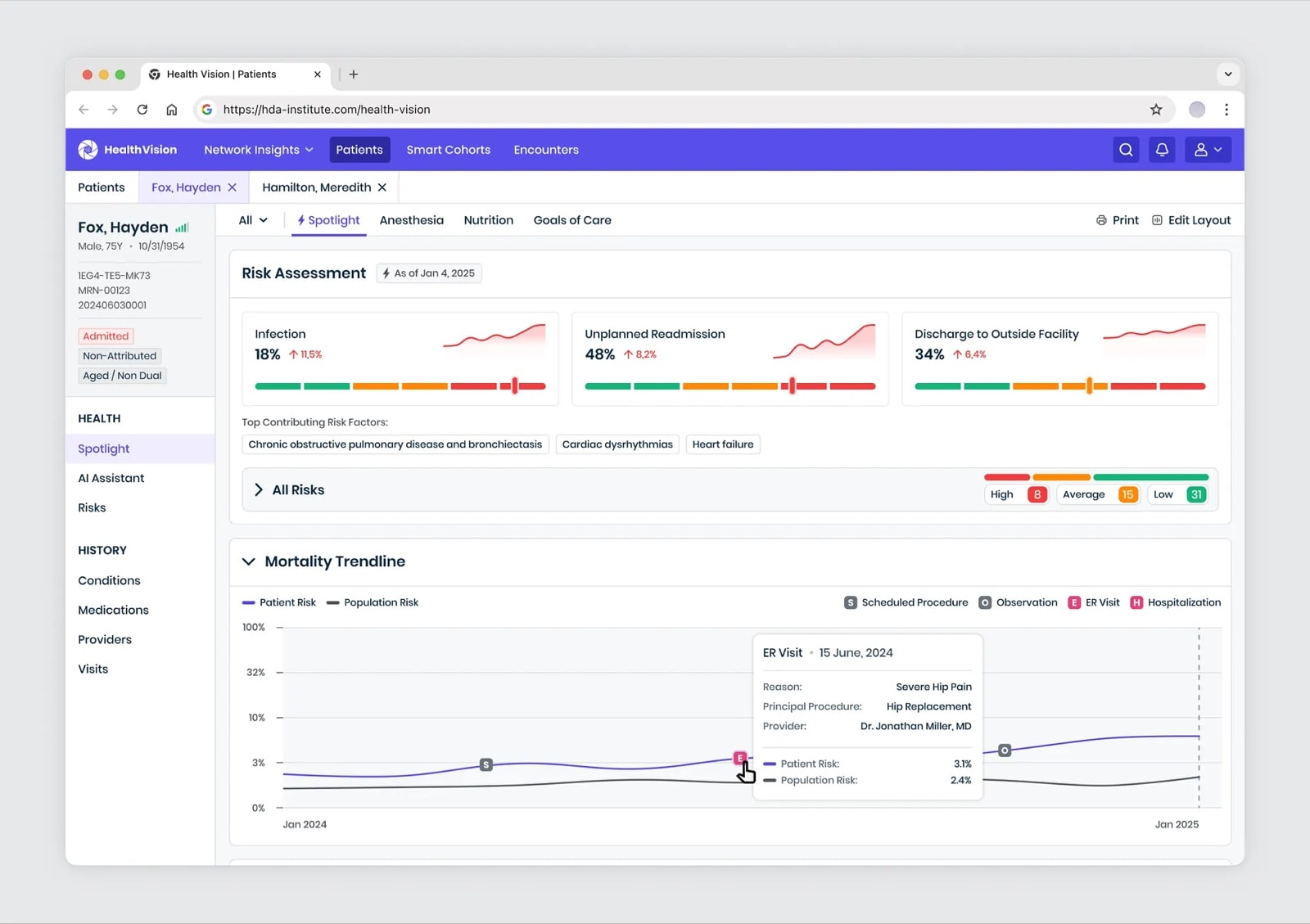
Health Vision Patient Spotlight for a sample patient: risk assessment cards for infection, unplanned readmission and discharge to an outside facility, top contributing risk factors, and a mortality trendline comparing the patient with the population, marked with procedures, observations, ER visits and hospitalizations
Patient Spotlight with detailed history, procedure details, and risk trends over time.

Overview

The amount of data in the EHR is beyond human capacity

There aren't enough hours in the day for clinicians, or any frontline worker, to review everything in a patient's record and take the next best action. Each patient generates thousands of data points: notes, labs, scans, prescriptions, and histories. Most of it goes unused, adding complexity and burden instead of clarity.

Health Vision, built by the Health Data Analytics Institute, is an AI-powered, clinician-focused platform that uses real-time predictive analytics and generative AI to turn a patient's full medical history into a clear summary of their health, highlighting and ranking the most important clinical risks.

I led product design from the earliest concepts through the Series B and C funding rounds, working with product, engineering and clinical stakeholders, and established the information architecture, interaction patterns and design system the platform grew on.

“Elisey is a talented, versatile designer who made building our Health Vision app a great experience. From research to UI, branding, and complex AI visuals — he nailed it. His work set the standard for our other products.”

Carola Endicott VP of Customer Engagement, Health Data Analytics Institute

Design goals

Design goals

The data isn't clean or uniform. It comes from structured EHR encounters, unstructured notes, Medicare records, billing and payer data, census and ADT feeds, and more. Useful in theory, overwhelming in practice. The real value isn't just in what happened, but in predicting what comes next: machine learning and generative AI build and validate hundreds of predictive models. At this scale, product design becomes mission-critical.

  1. Turn data into usable information

    Surfaced at the right moment.

  2. Fit naturally into workflows

    Making data easier to interact with.

  3. Flag the highest-risk patients in real time

    Helping organize care and save time.

  4. Personalize care

    Uncovering hidden risks and insights, reducing the burden on providers.

/01. Patient roster

From a static list to a real-time view of risk

The patient roster is often where a shift begins, and where every minute counts. I redesigned it from a static list into a real-time, prioritized view of risk. As new notes, diagnoses, or encounters come in, the roster updates automatically, surfacing the patients who need attention first, whether they're scheduled, admitted, in surgery, or recently discharged.
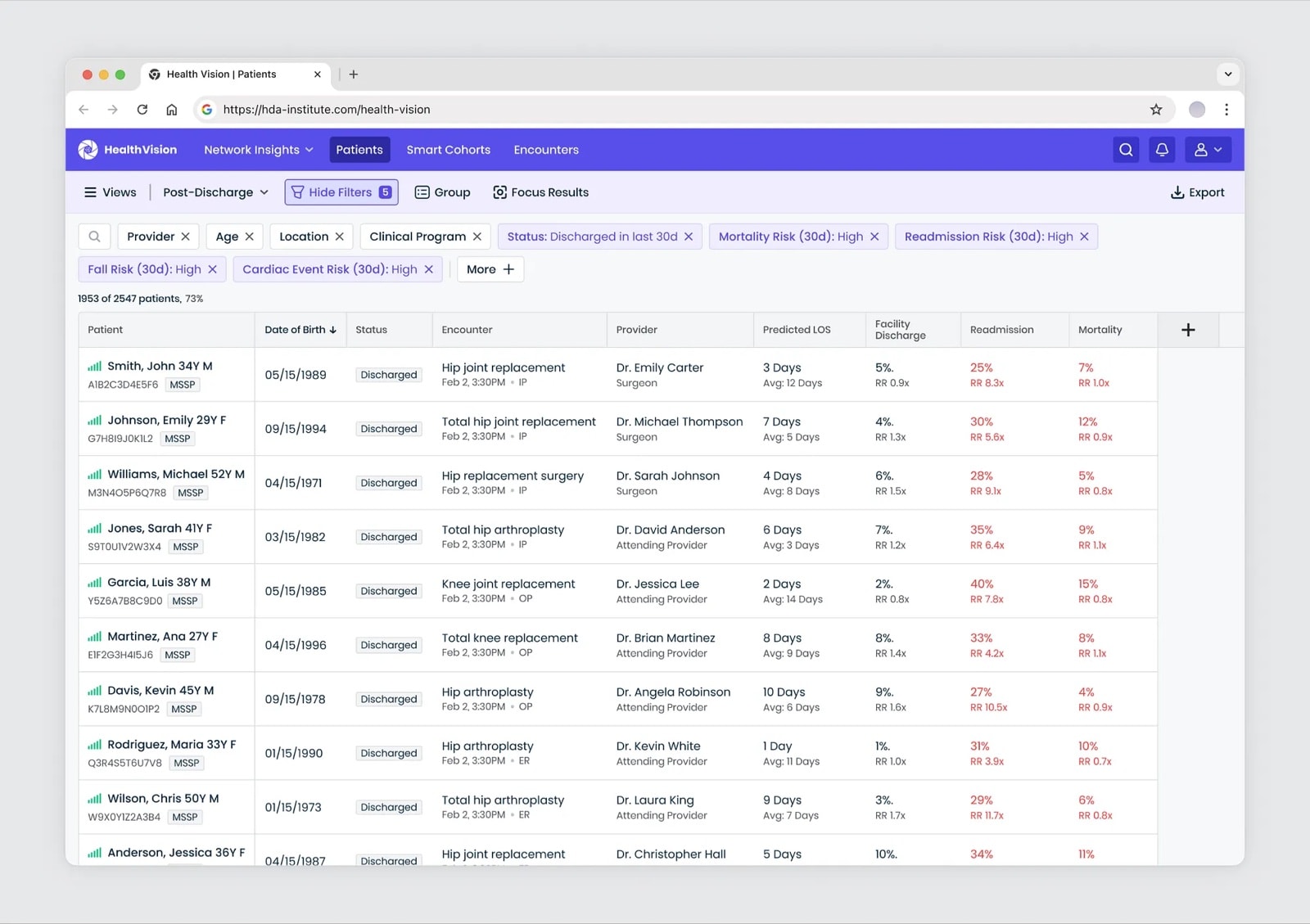
Patient roster of discharged sample patients with applied filters as chips, predicted length of stay, facility discharge, readmission and mortality risk with relative risk for each patient
Patient roster view.

/02. Filtering

Filtering that fits clinical workflows

Clinicians needed a way to cut across hundreds of data points, such as past encounters, diagnoses, utilization, adverse events, costs, and forward-looking risks, without digging through endless menus. I kept the most common filters visible on the surface, moved advanced options under a "More" menu to keep the workspace clean, and made applied filters sticky and visible, so clinicians always know what view they're working with.

When clinicians need more precision, they can choose whether patients match every filter or any of them, refine a broad group step by step, filter by risk level, baseline or percentile, and look back in time, for example at patients with an event in the last month. This made it possible to spot patterns and follow up on recent changes without digging through records manually.
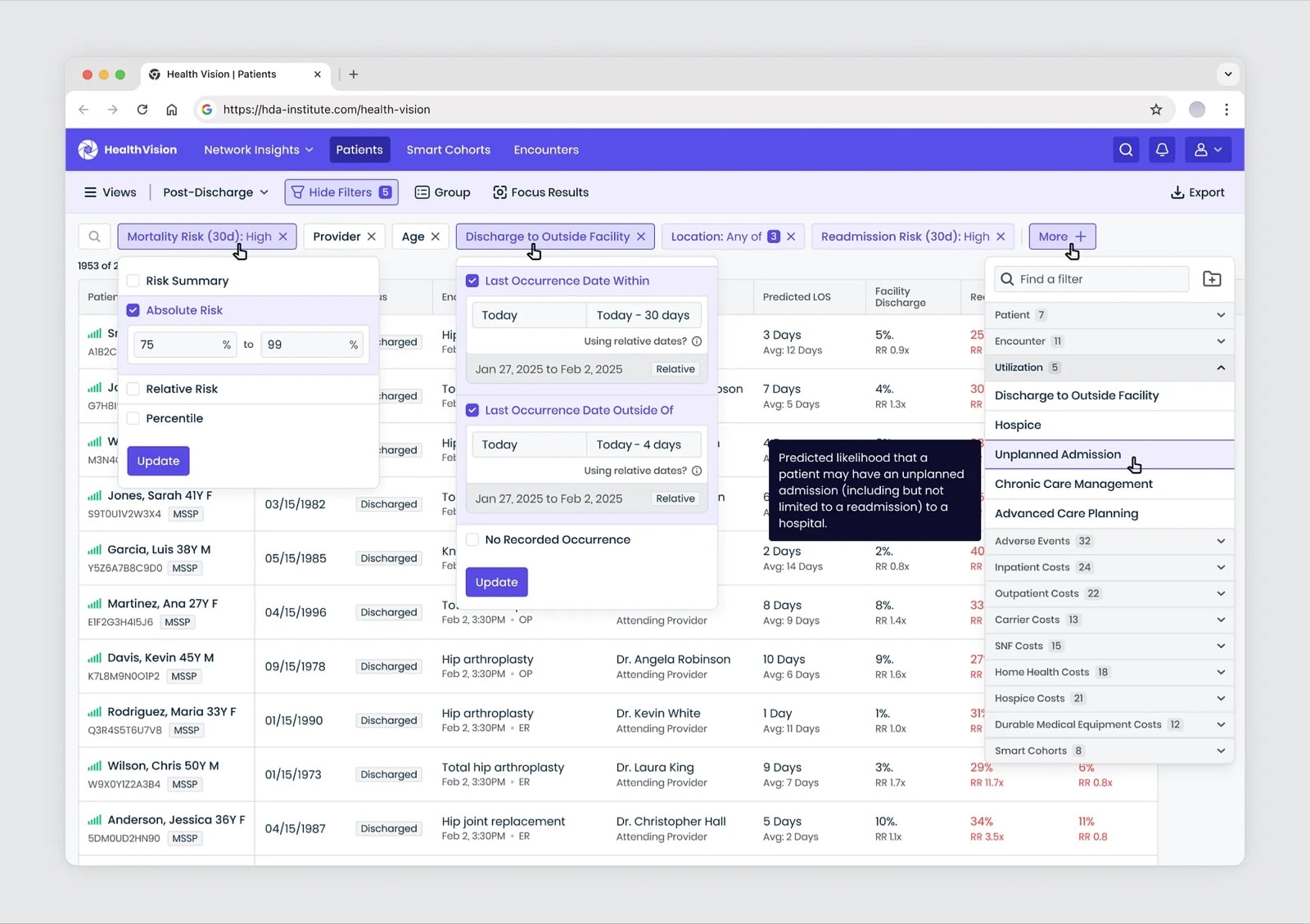
Extended filter options: an absolute risk range, last occurrence within or outside a date range, and a More menu of filter categories such as patient, encounter, utilization, adverse events and costs
Example of the extended filter options.

/03. Focus

Zeroing in on critical patients

During testing, clinicians told us that even a refined list could still feel overwhelming. To help them act faster, I added a Focus feature that highlights only the most critical patients within a filtered group.

For example, after selecting admitted patients with multiple conditions, a clinician can instantly see just the five with the highest mortality risk. What was once a long dataset becomes a clear, prioritized shortlist for action.
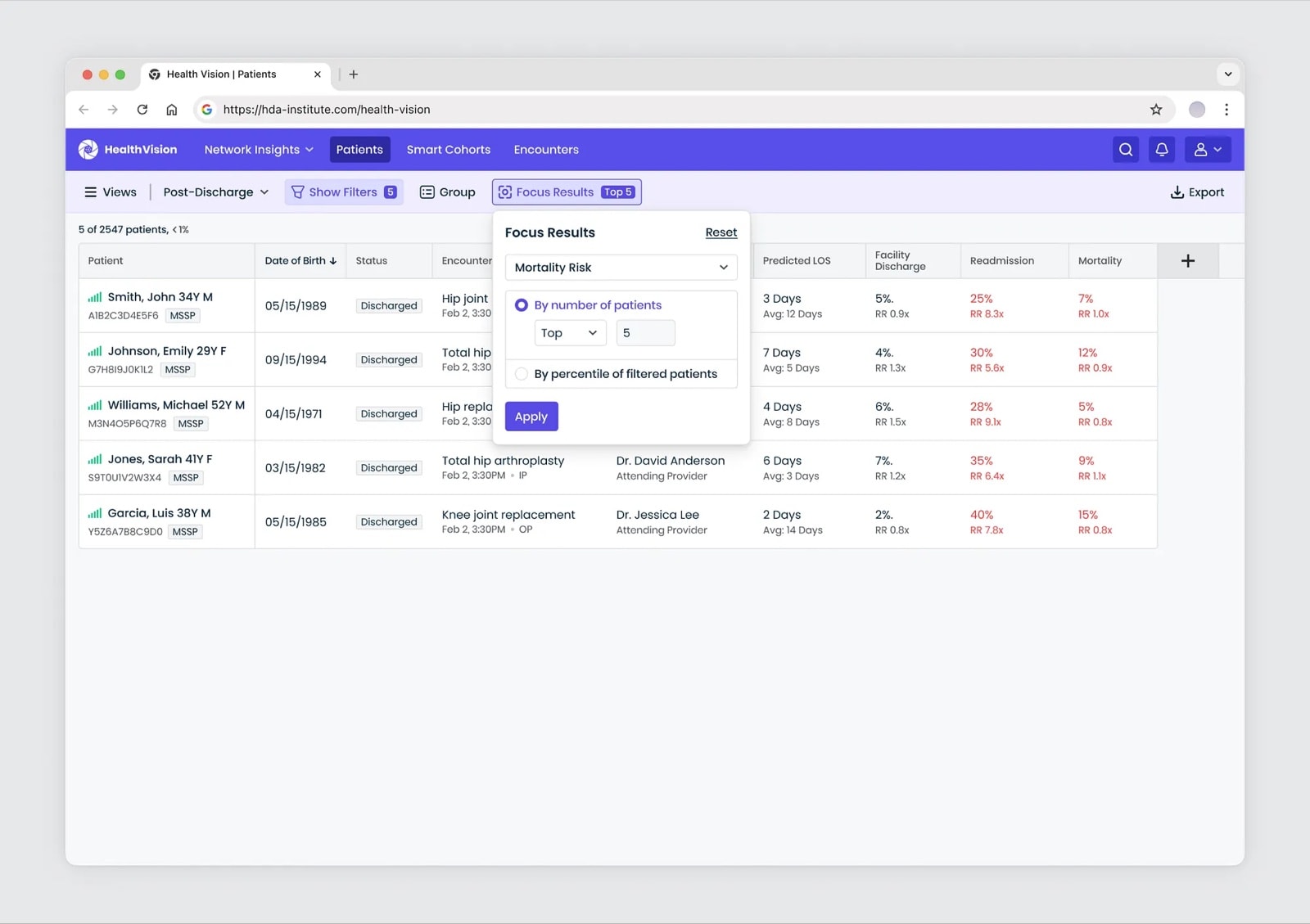
Focus Results menu set to mortality risk, top 5 by number of patients, narrowing the roster to five patients
Focusing on the top 5 mortality-risk patients in the filtered list.

/04. Cohorts and saved views

A roster that adapts to the clinician

Many clinicians were rebuilding the same filters again and again. To save time, I introduced Smart Cohorts: dynamic groups that update automatically as patient data changes. They can be reused anywhere in the platform, they remove repetitive setup, and they give teams a reliable way to track the patient groups that matter most.
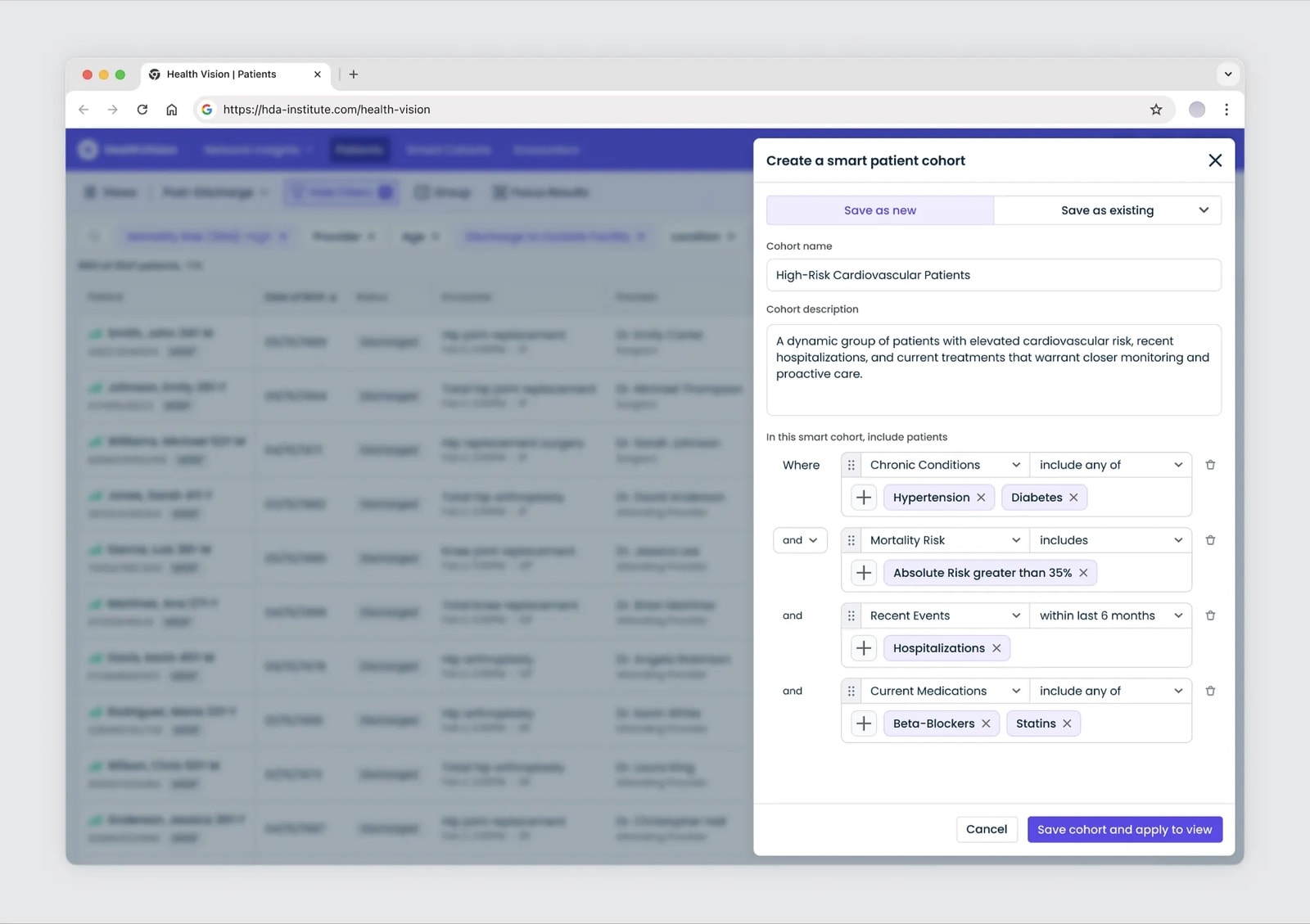
Create a smart patient cohort panel: High-Risk Cardiovascular Patients defined by chronic conditions, mortality risk above 35%, hospitalizations within the last 6 months, and current medications
Creating a smart patient cohort.

A surgeon and a discharge nurse look at the same patients through very different lenses. With Saved Views, each role can store their preferred filters, cohorts, and roster layouts, and return to them with one click. The roster adapts to the clinician, not the other way around.
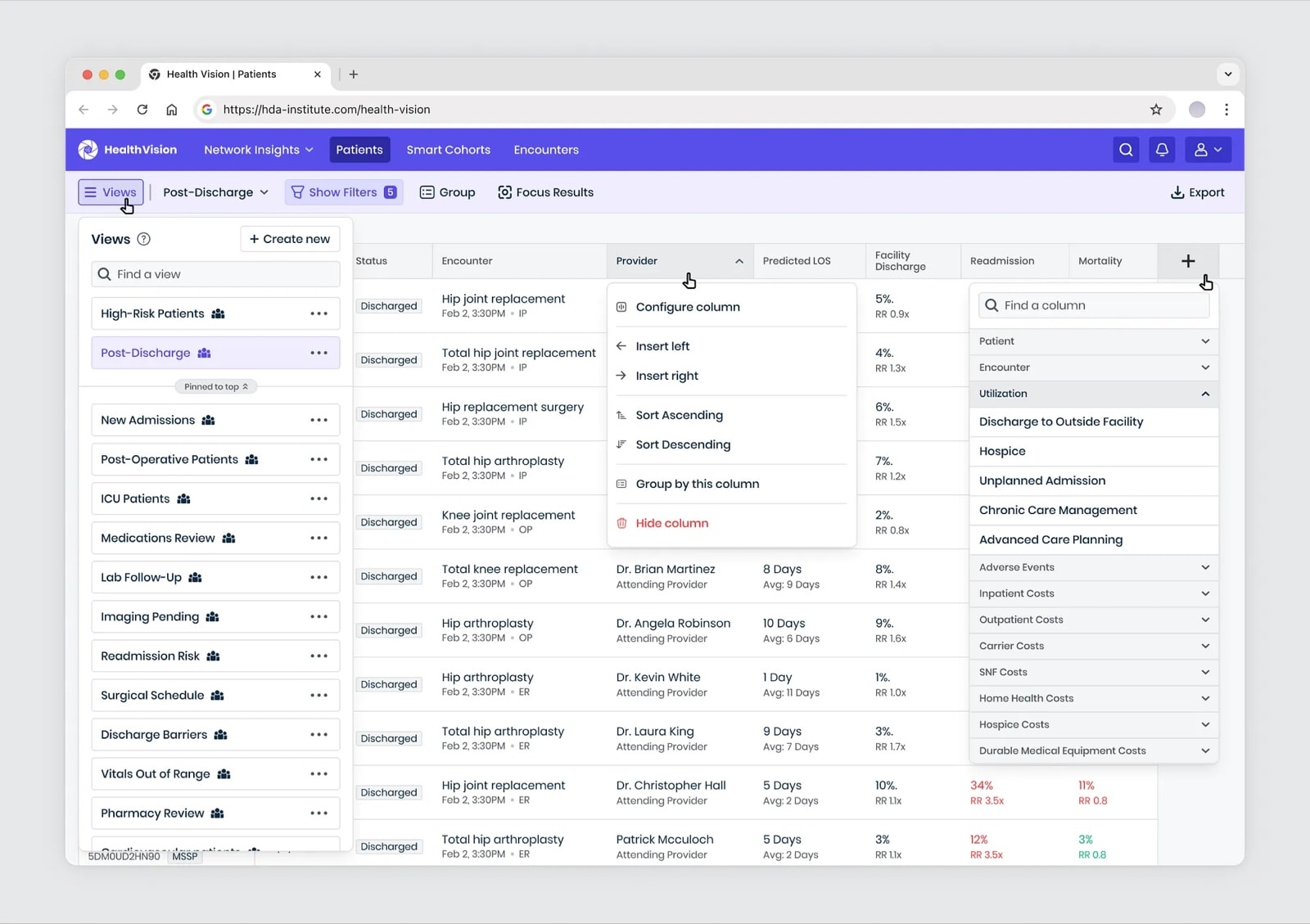
Saved views list such as High-Risk Patients, Post-Discharge, New Admissions and ICU Patients, with column options to configure, insert, sort, group or hide columns and add risk columns
Customizing the view based on your needs and workflow.

/05. Patient Spotlight

A patient snapshot clinicians can trust

The Patient Spotlight gives clinicians a quick, scannable snapshot of a patient's health. It surfaces the most important risks and insights in real time, so clinicians can preview the essentials before deciding whether to dive deeper. Every insight links back to its source note, making it easy to trace details and review the full history when needed.

The Spotlight is built around customizable widgets. Clinicians can configure their layout to highlight what matters most, such as cardiovascular risk, recent hospitalizations or medication changes, so the snapshot adapts to different roles and workflows.
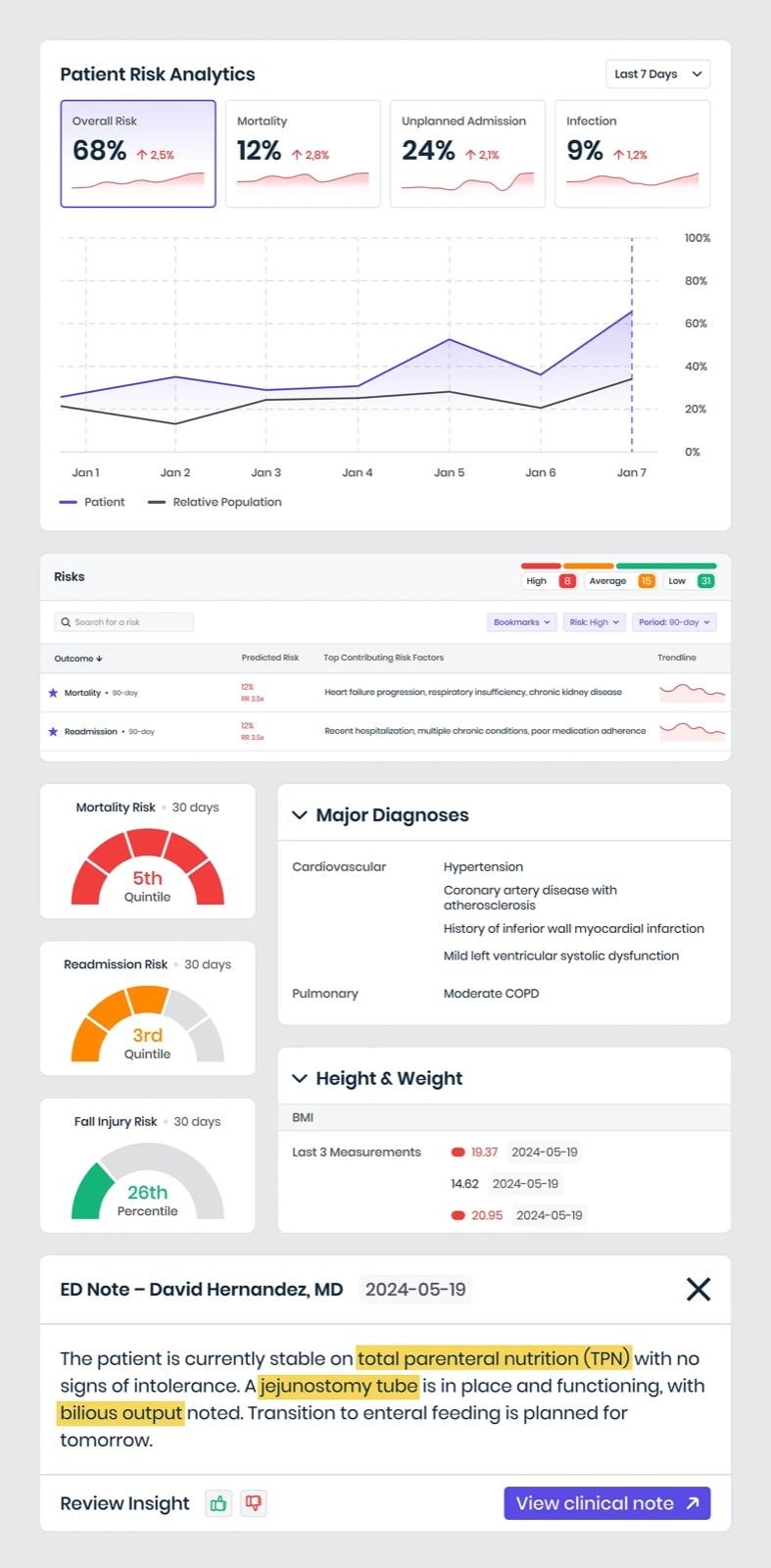
Spotlight widgets: patient risk analytics comparing the patient with the relative population, a risks table with top contributing factors, risk quintile gauges, major diagnoses, height and weight, and an ED note with highlighted terms and a Review Insight control
Spotlight widgets: risk trends against the population, contributing factors, and insights linked to the clinical note they came from.

AI-powered summaries add another layer of efficiency. Clinicians can switch between categories such as Anesthesia, Nutrition and Goals of Care. Each summary is supported by direct links to source notes, with a side panel for deeper reading when needed. The outcome is a patient snapshot that saves time, adapts to different needs, and shows where each insight comes from.
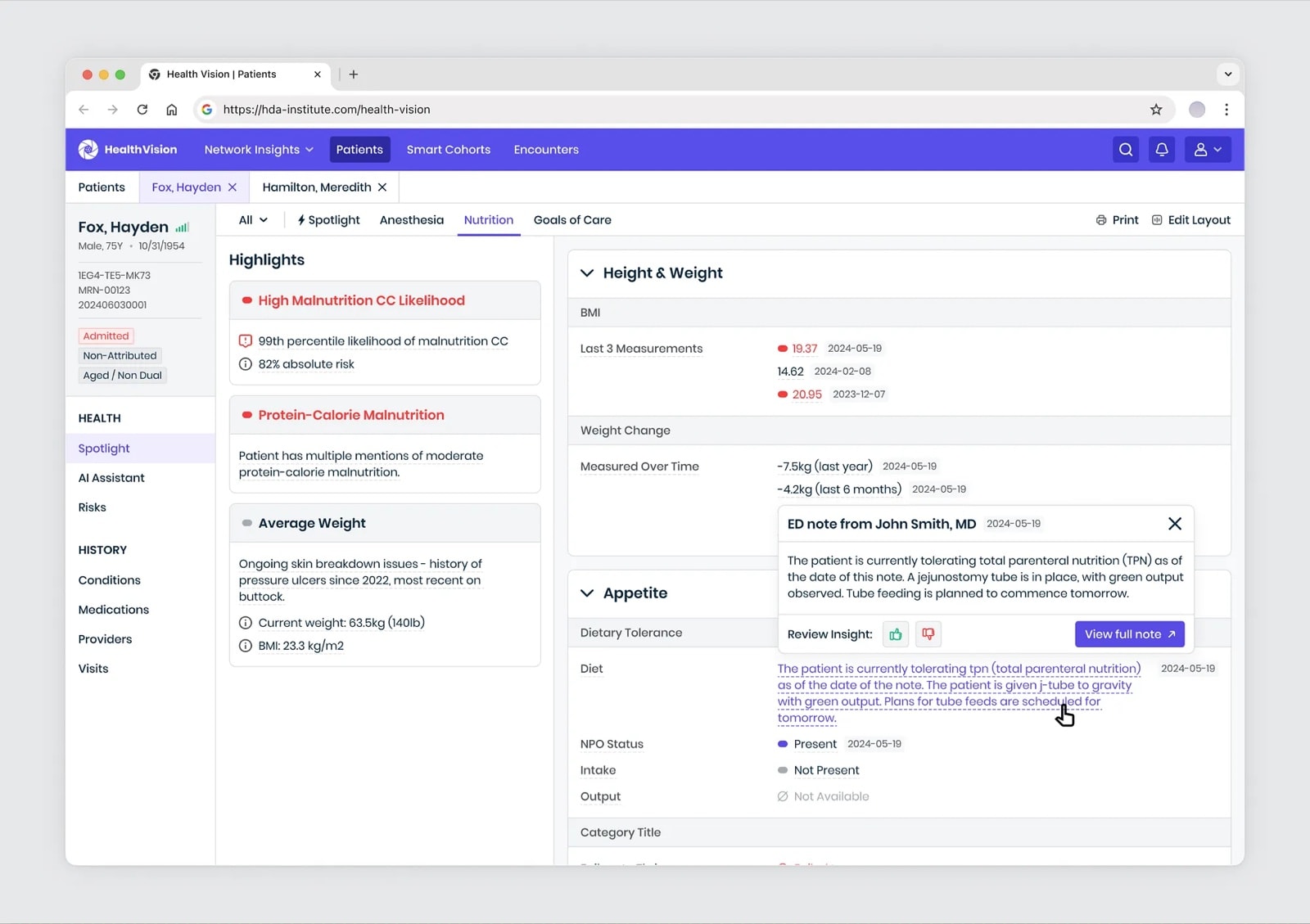
AI-generated nutrition summary with highlights for malnutrition risk, weight change over time and appetite, and an ED note opened from a linked sentence with a Review Insight control
AI-generated nutrition summary with risks, weight changes, and appetite, linked to source notes.

Real-world use

In use at top U.S. health systems

Health Vision is in use at some of the top healthcare systems in the U.S., including Houston Methodist and Cleveland Clinic. Here's how they apply it:

  1. Pre-operative clearance

    Surgical teams use the Spotlight to see which patients are at highest risk and need extra care or specialist consultations before surgery.

  2. Fewer post-discharge deaths and readmissions

    Clinicians prioritize patients most at risk of complications and use health summaries to guide outreach and follow-up.

  3. Proactive discharge planning

    Patients likely to need a facility discharge are flagged early, so care teams can plan and reduce risks like falls or readmissions.

  4. Slowing heart failure

    High-risk heart failure patients are identified while admitted, enabling outreach to slow progression to advanced stages.

Tell me what you're building, and I'll ask a few questions to understand it.

← Back to Selected Works
Ask Elisey anything…AI chat

Go to

Selected WorksPage
Work ExperiencePage

Case studies

CiteMedAI-assisted clinical-evidence platform • 2026Case study
Health VisionAI-powered clinical intelligence platform • 2026Case study
CovisionEvent management SaaS • 2025Case study

Contact

Email Eliseyhello@eliseykolev.comCopy
Visit LinkedIn ProfileLink
Elisey Kolev
Ask Elisey TabAsk Elisey ↵